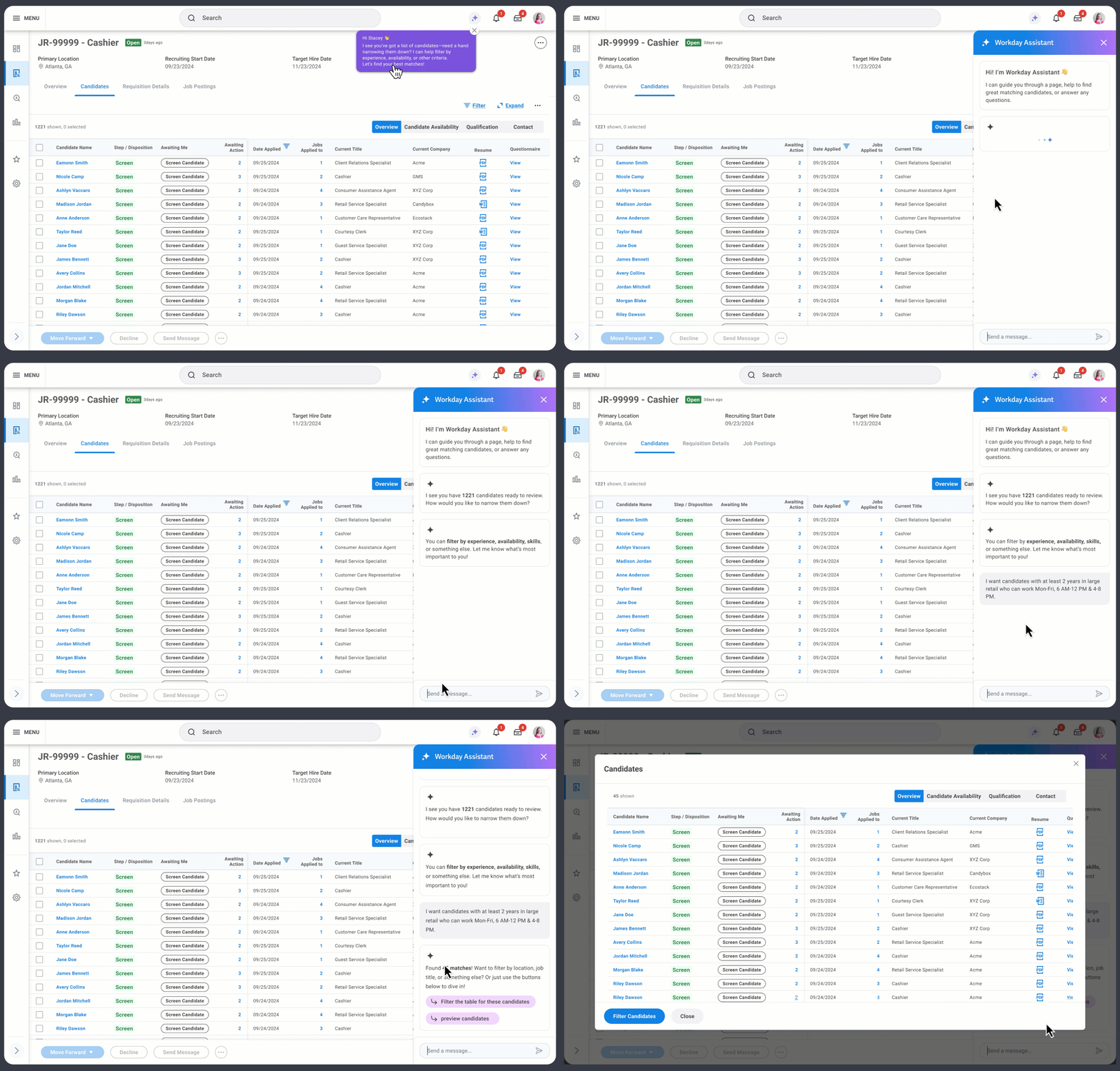
Workday Recruiting helps organizations from mid-size to Fortune 500 hire for high-volume, shift-based roles in retail, healthcare, hospitality, and manufacturing, often filling 15+ roles from thousands of applicants. With seasonal spikes and high turnover, speed is everything. I led design across the candidate and recruiter experiences, and when priorities shifted, helped steer the work toward AI-assisted screening.
OutcomeRecruiters rated the new filtering 5/5 and candidates found sharing availability easier (4/5). When priorities shifted to AI, I turned the work into an Assistant MVP that became the blueprint for AI in Workday Recruiting.
4/5 easier to share availability
5/5 for the advanced filter
Blueprint for AI integration
Problem: Nobody could see when people were available to work
For shift-based roles, availability is the first thing that decides a match. Yet Workday had no standard way to collect it or act on it, so the gap showed up for candidates and recruiters alike.
Candidate problem
“When can you work?” was hard to answer
There was no place to share availability within the current application flow. Some employers buried it in custom questionnaires that were easy to miss, so candidates lost out on shifts they could have worked.
Recruiter problem
Recruiters had to dig for the one thing they needed
Availability wasn’t visible at a glance, so recruiters opened profiles one by one. With thousands of applicants, hiring slowed and good candidates went elsewhere.
Discovery: Mapping the hiring journey end to end
My design teammate and I reviewed past research, explored AI hiring trends, mapped the candidate journey, and benchmarked competitors to find gaps and opportunities.
Past research & AI trendsWhat Workday already knew about recruiters, and where AI hiring tools were heading
Competitive benchmarkHow other platforms collect and surface availability, used to stretch what felt technically possible
Interactive journey mapFive hiring stages, real scenarios, and pain points in one shared artifact
The interactive journey map aligned PMs, engineering, and research on where availability friction happened.
What we learned
01Availability data existed, but in inconsistent, customer-specific formats that were hard to compare.
02For recruiters, availability sat two layers deep in the candidate profile, far from where screening decisions happen.
03Both problems had to be solved together: better input for candidates only matters if recruiters can see and filter by it.
Track 1 of 2
Candidate track: A standard way to share availability
Design goalMake availability entry simple, clear, and upfront, within the existing Apply flow, by reducing confusion, standardizing input, and placing it where candidates expect it.
Concepts: Predefined, custom, and broad time slots
After my teammate rolled off, I became the sole designer across both flows. I explored three ways to capture availability within the existing application framework. The team leaned toward quicker options, but I advocated for a more scalable custom input.
Tested with 7 participants in moderated sessions · 4 retail, 2 healthcare, 1 manufacturing
1 · Predefined slotsPick from fixed shift blocks.Why: Cheap to build and maintain.
Test resultWorked: Easy to navigate.Didn’t: Confusing slots led to wrong input.
2 · Custom slotsEnter exact days and hours.Why: Most accurate; scales across industries.
Test resultWorked: Highest satisfaction; clear input.Didn’t: Concern about employer fit.
3 · Broad times of dayChoose morning, afternoon, or evening.Why: Fastest for candidates.
Test resultWorked: Simple, minimal clicks.Didn’t: “Morning” meant different things to different people.
Key insightTesting overturned our assumption: time preferences varied by job type (full-time vs. part-time), not by industry.
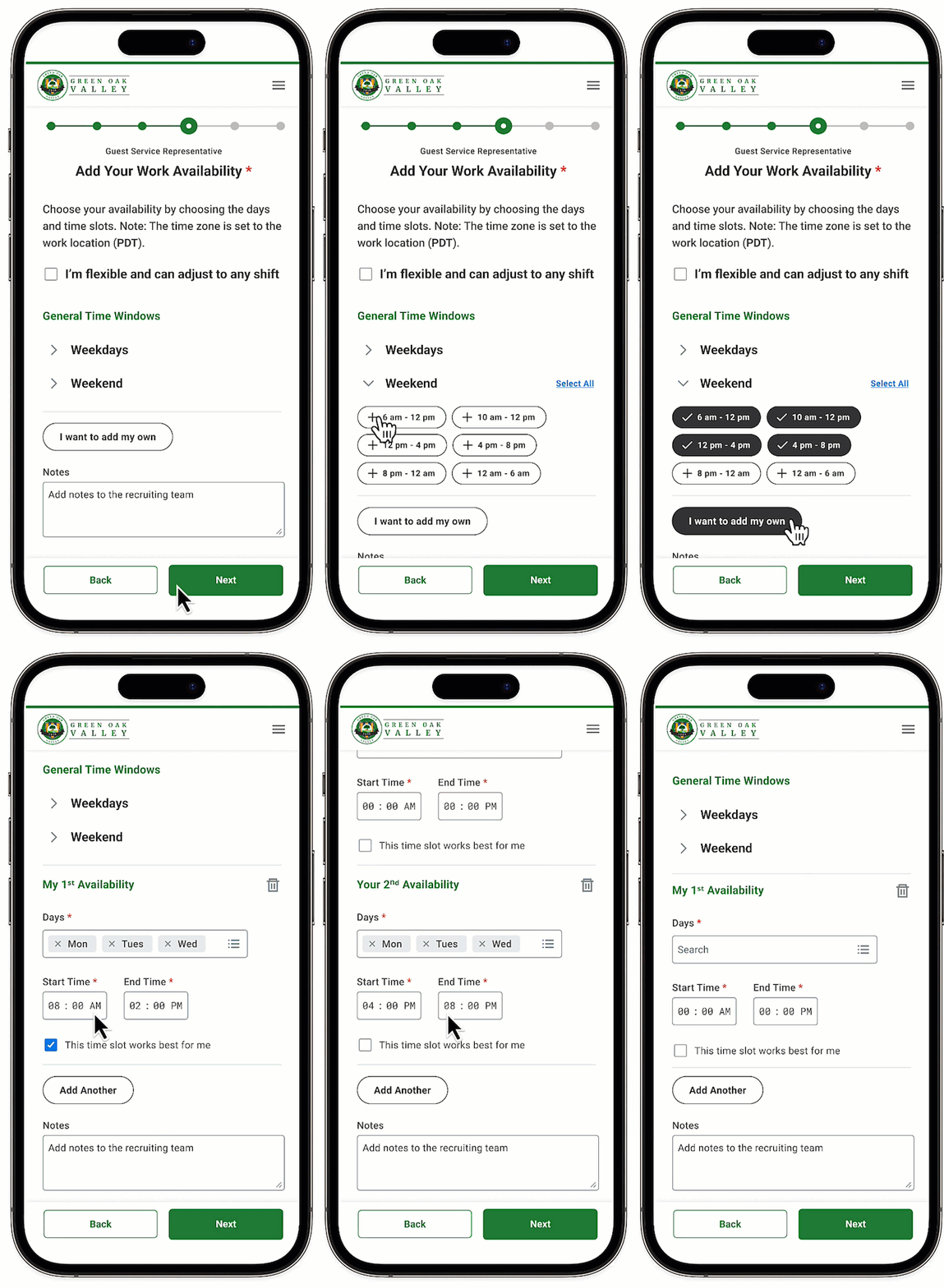
Final design: One flexible input for both job types
Companies often hire for both full-time and part-time roles, so one input handles both.
Full-time roles
Broad time blocksThe layout that tested best, using the company’s own shifts.
Part-time roles
Custom slots and preferencesExact days and hours, with a way to flag favourites.
Both
Weekdays and weekends groupedLess repetitive input.
Participants responded positively to the changes.
Track 2 of 2
Recruiter track: Finding available candidates without digging
Collecting availability was only half the problem. Recruiters also needed to see it and act on it where they screen: the candidate table.
Design goalMake it easy for recruiters to find key info by simplifying the layout, optimizing space, making availability visible, and adding better search and filters.
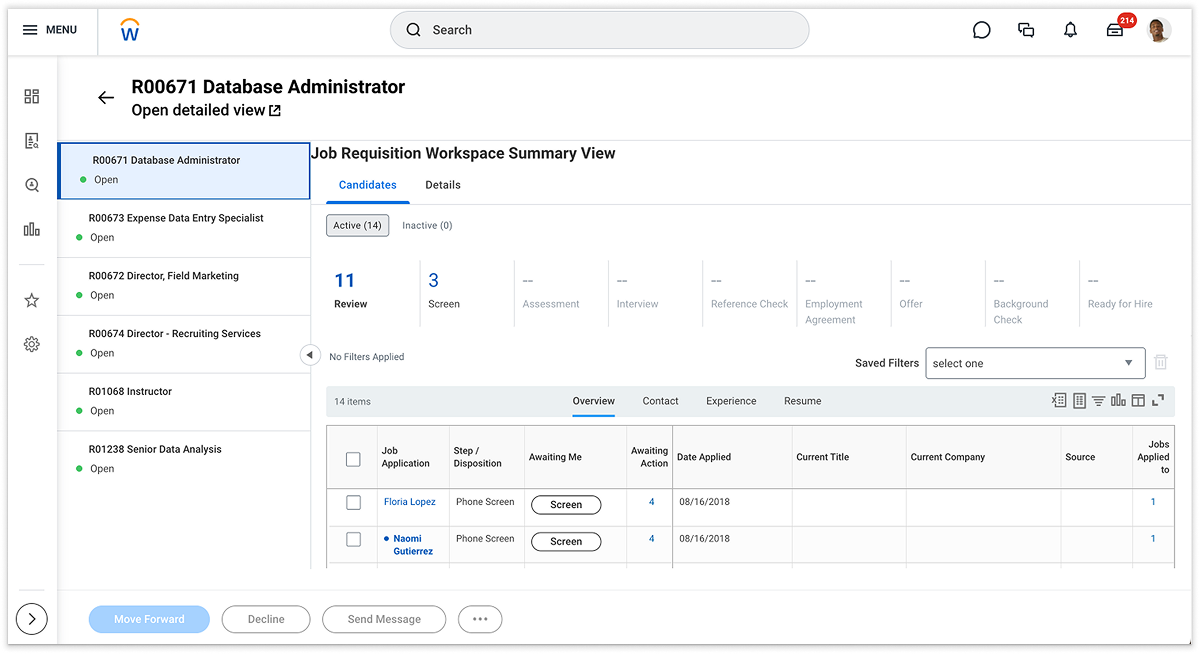
Friction points: The table hid what recruiters needed most
This is where the journey map turned into priorities. Recruiters spend most of their day in the candidate table, so small problems here multiply across thousands of candidates. I found four main gaps.
1325
4
1Rarely used stages took prime space, with no job requisition details
2Too little room for critical details
3No availability view
4Availability was buried or non-existent
5No search, and filters limited to columns
Why availability came firstFor shift-based hiring, availability is everything. If you can’t see that someone works Saturday mornings, you can’t fill a Saturday shift. It had the biggest impact on the recruiter’s core job, so it became my top priority.
Concepts: Availability tab, AI search & advanced filters
I fixed the table first, then explored two ways to sort large candidate pools without column-by-column filtering.
General table improvements
Put availability and job context where recruiters already look.
1342
1Job requisition summary replaces the status strip
2Taller table shows more candidates
3Fewer tabs, with resume and questionnaire now in Overview
4Dedicated availability tab for shift-based roles
Search and filter variations
Two ways to narrow large candidate pools without filtering one column at a time.
5a
5b
5aUses Workday’s global search engine with intelligent suggestions
5bCentralized filters with a live preview of the result count, plus saved filters
Key insightRecruiters wanted AI’s speed, but only with the transparency and control they got from filters.
Pivot: Priorities shifted to fast-track AI
With the design validated through research and handed to engineering, product leads pivoted to fast-track the AI assistant. Here's what I did once I learned the priority had shifted.
01 · Flagged risksHighlighted what a rushed rollout could break.
02 · Built an MVPRapidly concepted and prototyped what the MVP experience should look like with the AI assistant.
03 · Won buy-inDemoed the MVP to leadership to secure support for a controlled, strategic launch.
Final design: An Assistant that works with the candidate table
Table optimizationRedesigned to use space better and present candidate information clearly.
Improved navigationTabs reorganized based on research for fast access to key details.
Availability accessA dedicated Work Availability tab cuts the clicks to find it.
AI enhancementThe Workday Assistant, extended for high-volume recruiting, filters the table directly.
Impact: Faster, clearer high-volume hiring
4/5Candidates found it simpler to share availability and get better matches.
5/5Recruiters rated quick access to candidate availability at a glance.
5/5Recruiters rated the advanced filter for surfacing key candidate info.
AIEarly stakeholder feedback signaled strong potential to scale the Assistant MVP.
 Candidate problem
 Recruiter problem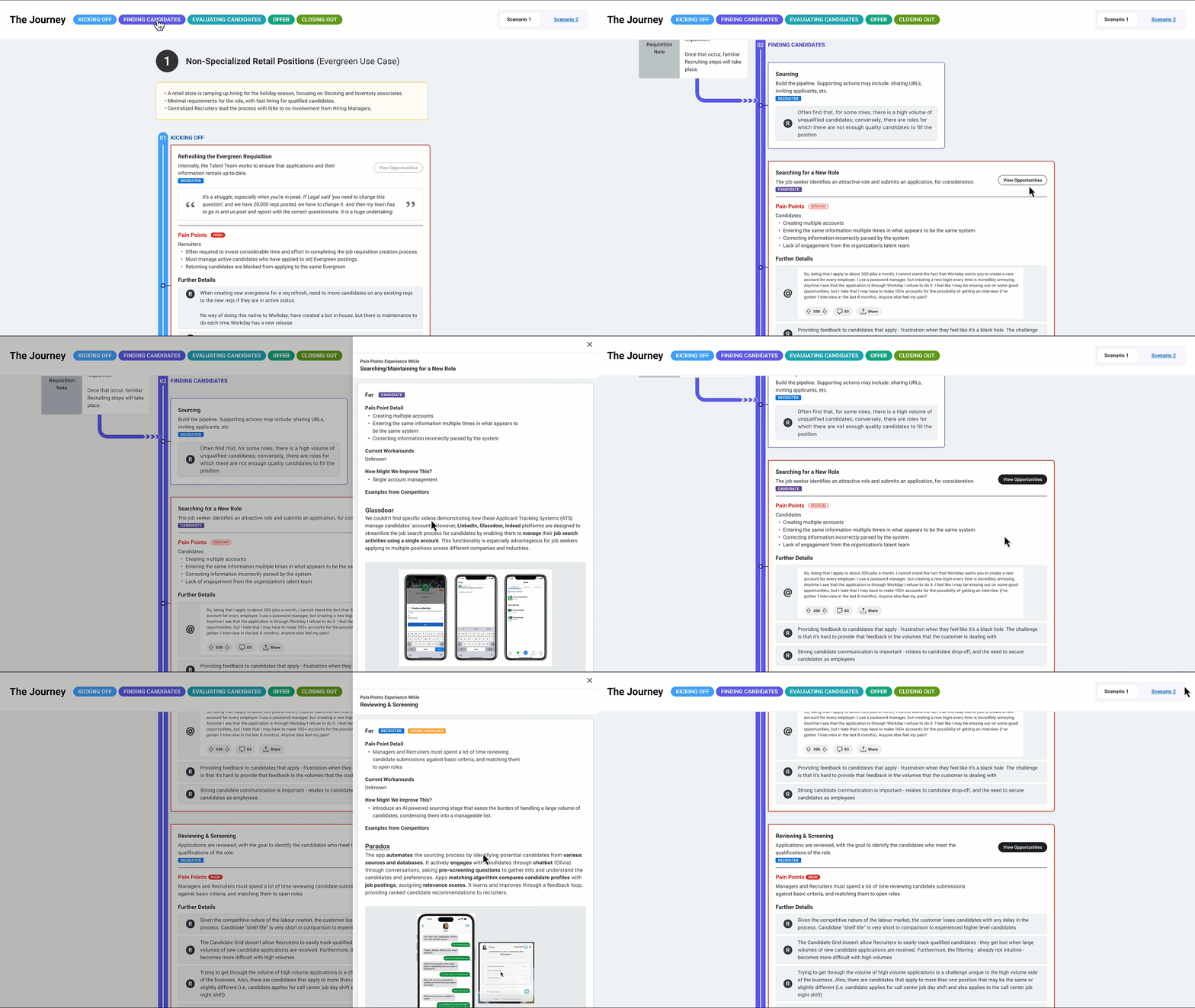
 1325
1325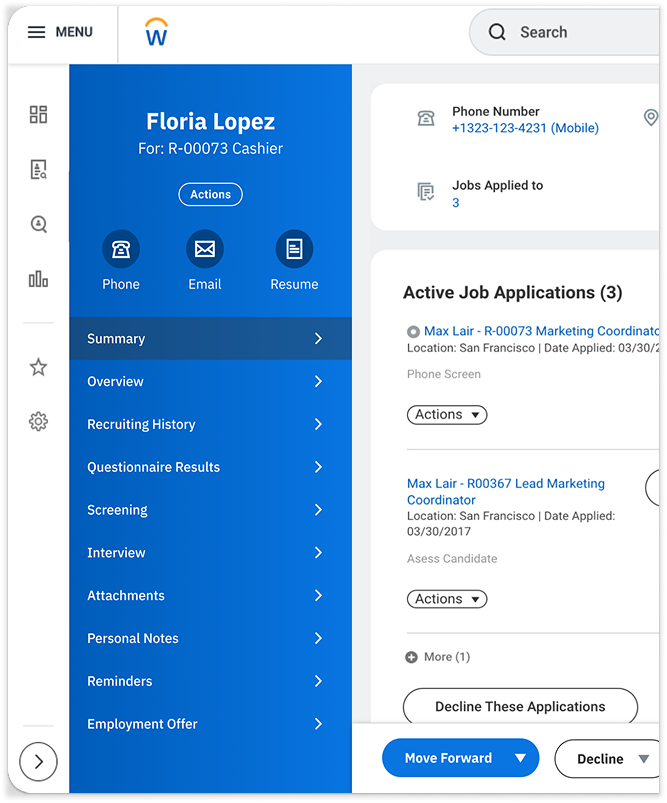
 4
4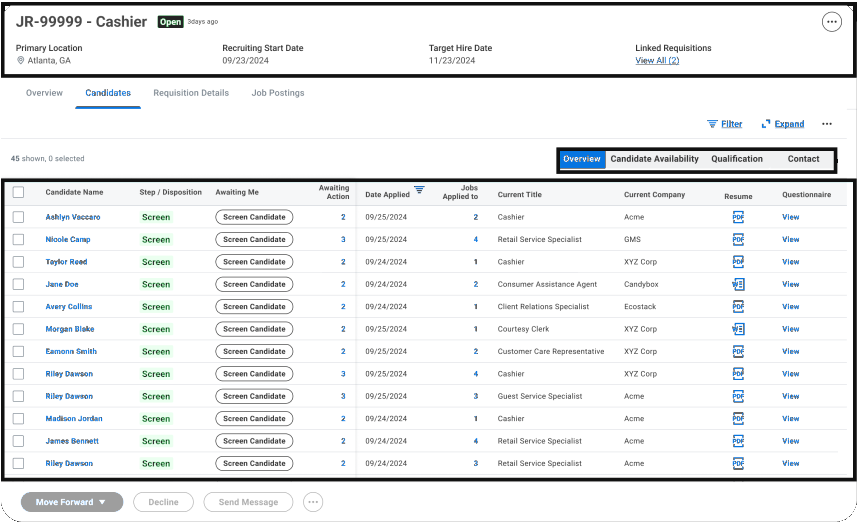 1342
1342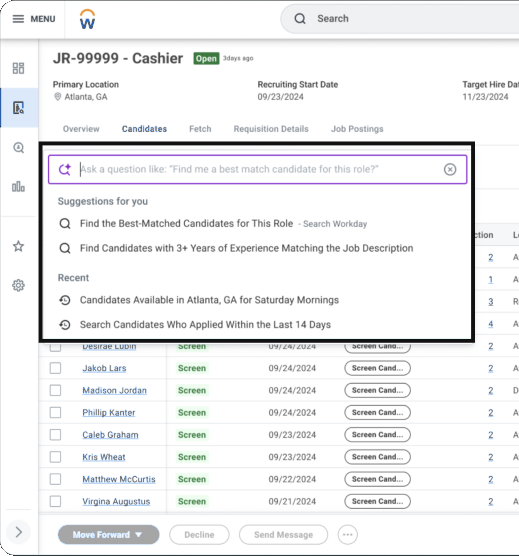 5a
5a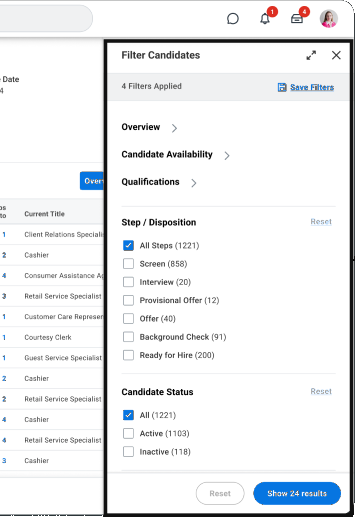 5b
5b